
The Ultimate Guide to Google Tools for Remote Work in 2025 (Features You Didn’t Know Existed)
In 2025, remote work is no longer about just having Zoom and Slack. It is about integration.
The average freelancer wastes 20% of their week switching between apps. You have your files in Dropbox, your meetings in Zoom, your notes in Notion, and your email in Gmail. This “toggle tax” kills your flow.
The most efficient remote workers have realized that the most powerful ecosystem is likely one they already have for free: Google Workspace.
But most people are using 2020-era Google tools. They don’t know about the 2025 AI upgrades. They haven’t seen Google Vids, the Gemini Side Panel, or the AppSheet automation that builds apps from spreadsheets in seconds.
This guide will walk you through the essential google tools for remote work that define the modern digital office. We will move beyond the basics and show you the specific “Power Workflows” that top-tier freelancers and distributed teams use to outproduce the competition.
Part 1: The “Zero-Admin” Meeting Architecture
Stop taking notes. Stop chasing availability.
Meetings are the enemy of deep work. The best google tools for remote work are the ones that make meetings shorter or unnecessary.
1. Google Calendar “Appointment Schedules” (The Calendly Killer)
If you are paying for Calendly, stop. Google Calendar now has a robust Appointment Scheduling feature built-in.
- The 2025 Upgrade: You can now create multiple booking pages for different services (e.g., “15-min Discovery Call” vs. “1-Hour Strategy Session”) directly from the calendar sidebar.
- Why it wins: It automatically checks your personal calendar for conflicts, ensuring you never get double-booked.
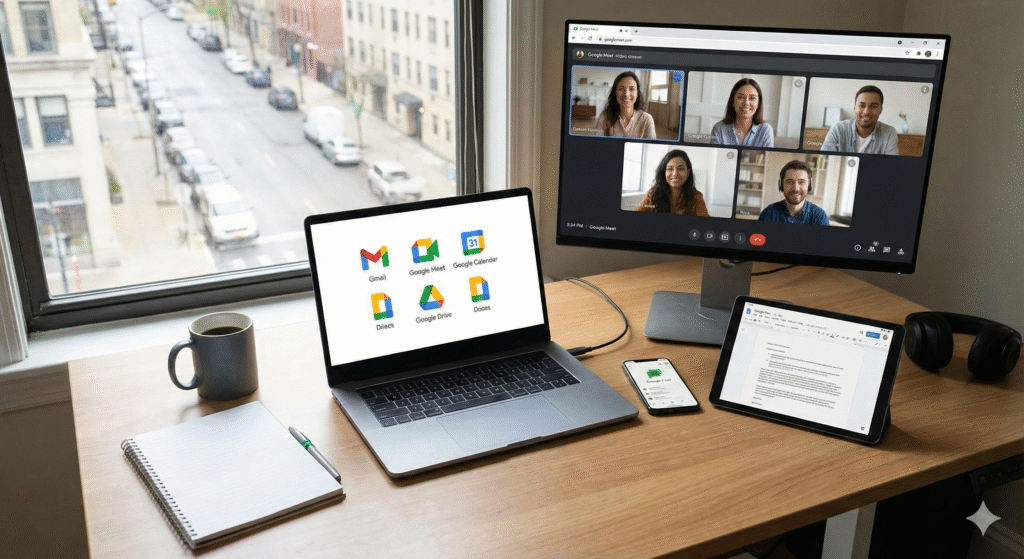
2. Google Meet + Gemini (Your AI Secretary)
Google Meet has evolved. It is no longer just a video pipe; it is an intelligent assistant.
- “Take Notes for Me”: In 2025, you can click a button and Gemini will transcribe the meeting, summarize key decisions, and list action items.
- Adaptive Audio: If you are a digital nomad working from a cafe, Meet now uses AI to merge audio from multiple laptops in the same room, eliminating that painful echo without needing expensive hardware.
The “Zero-Admin” Workflow:
- Client books time via Calendar Appointment Page.
- Meeting happens on Meet (with noise cancellation).
- Gemini emails the summary and action items to both parties instantly. Result: A professional client experience with zero manual admin.
Part 2: Asynchronous Updates (Stop Sending Long Emails)
The future of remote work is video, not text.
Writing a 500-word email update takes 20 minutes. Recording a 2-minute video takes… 2 minutes.
3. Google Vids (The New Powerhouse)
This is the biggest game-changer of 2025. Google Vids is an AI-powered video creation app for work.
- What it does: It sits alongside Docs and Sheets. You give it a prompt (e.g., “Create a weekly update based on this Project Tracker Sheet”), and it generates a video storyboard with stock footage, voiceovers, and background music.
- Use Case: Instead of a Friday status meeting, send a 60-second Google Vid. It keeps the human connection alive without forcing everyone onto a call.
4. Smart Canvas in Google Docs
Documents are no longer static pieces of paper. They are interactive apps.
- The Feature: Type
@in any Doc to pull in “Smart Chips.” You can insert a countdown timer, a project tracker dropdown, or even a direct preview of a Google Map location. - Why it matters: It turns a simple document into a Project Dashboard. You can assign tasks to colleagues directly in the doc, and it syncs to their Google Tasks.
Part 3: No-Code Automation for Non-Techies
Build your own software without writing code.
One of the most underutilized google tools for remote work is AppSheet.
5. AppSheet (Turn Sheets into Apps)
As a freelancer, you probably track expenses or client leads in a Google Sheet. It’s clunky on mobile.
- The Fix: Open your Sheet, go to Extensions > AppSheet > Create an App.
- The Magic: Google’s AI analyzes your columns (Date, Amount, Receipt Image) and builds a fully functional mobile app in about 3 minutes.
- Result: You now have a custom “Expense Tracker” app on your phone. Snap a photo of a receipt, and it instantly syncs to your spreadsheet. No coding required.
Part 4: Data Analysis on Autopilot
You don’t need to be a data scientist.
6. Google Sheets + Gemini Side Panel
Excel is powerful, but formulas are hard. The new Gemini integration in Sheets changes everything.
- The Prompt: Instead of trying to remember how to do a VLOOKUP or Pivot Table, just open the Gemini side panel and type: “Analyze this sales data. Show me the trend line for Q3 and predict Q4 revenue.”
- The Output: Gemini generates the chart and the formula for you instantly. This allows you to offer “Data Analysis” as a service to clients, even if you aren’t a math whiz.
(Related: Once you master this, check out our guide on How to Sell SEO Services to see how you can package data reporting into high-ticket retainers).
Part 5: The “Digital Nomad” Survival Kit
Tools for when you leave the home office.
If you are traveling, these specific google tools for remote work are non-negotiable.
7. Google Lens (The Translator)
If you are working from Tokyo or Lisbon and can’t read the menu or the Wi-Fi instructions:
- Open Google Lens, point your camera at the text, and it translates in real-time using AR (Augmented Reality). It creates an overlay on your screen in English.
8. Google Keep (The OCR Scanner)
Stop typing out text from business cards or handwritten notes.
- The Hack: Take a photo of a document in Google Keep. Click the three dots and select “Grab Image Text.”
- It instantly converts the image into editable text. Perfect for digitizing contracts or brainstorming notes on the go.
Planning a trip? If you want to take your work on the road, read our guide on How to Work Remote in Europe to learn about the visas that let you stay there legally.
Part 6: Security Best Practices for 2025
Don’t get hacked at a coffee shop.
Using google tools for remote work is safe, but only if you configure them correctly.
9. Context-Aware Access (The Firewall)
If you have a Google Workspace Business plan, you can set up “Context-Aware Access.”
- The Rule: You can block access to Drive or Gmail if the device is not encrypted or if the IP address is from a high-risk country. This is crucial if you hire freelancers and want to protect your data.
10. The “Passkey” Revolution
Passwords are dead. In 2025, Google encourages Passkeys (using your fingerprint or FaceID to log in). It is phishing-resistant. Enable this in your Google Account settings immediately.
Summary: The “Ecosystem” Advantage
The power of using google tools for remote work isn’t in any single app; it’s in the connection.
- Your Calendar talks to Meet.
- Meet talks to Docs (transcripts).
- Docs talks to Vids (scripts).
- Sheets talks to AppSheet (apps).
When you embrace this entire ecosystem, you stop fighting your computer and start actually working.
Next Steps:
- Audit your stack: Are you paying for tools (Calendly, Zoom, Trello) that Google Workspace already does for free?
- Try one new workflow: Set up an Appointment Schedule in Calendar today.
- Level up: If you want to master the business side of this, read our guide on 10 High-Profit AI Business Ideas to see how to sell these setups to other businesses.